Most advice about an IPTV trial treats every home the same. In reality, what you need to check depends on what you watch on. A Fire TV Stick behind the TV, a Samsung Smart TV and an iPhone each have their own weak spots, and a 30-minute trial is only useful if you test the right one.
This guide gives you a device-by-device checklist for your IPTV trial, so you spend your 30 minutes on the things that will actually affect your viewing.
Key takeaways
- Run your IPTV trial on the device you will use most, normally the main TV.
- Each device has one key test: Wi-Fi on a Fire TV Stick, app support on a Smart TV, 4K on an Android box.
- Install the player app before the trial starts so none of the 30 minutes is wasted.
- Our trial is free, needs no card and is usually live within five minutes.
Contents:
- Before your IPTV trial
- The key test on each device
- A 30-minute plan for any device
- If something goes wrong
- After the trial
- FAQ
Before your IPTV trial
- Choose one main device. The one you will watch on most evenings.
- Install the player app now, before you ask for the trial. Our setup guides cover every common device.
- Pick a busy time, such as a weekend evening or a match night.
- Message us on WhatsApp with your device. Your trial details usually arrive in about five minutes.
The key IPTV trial test on each device
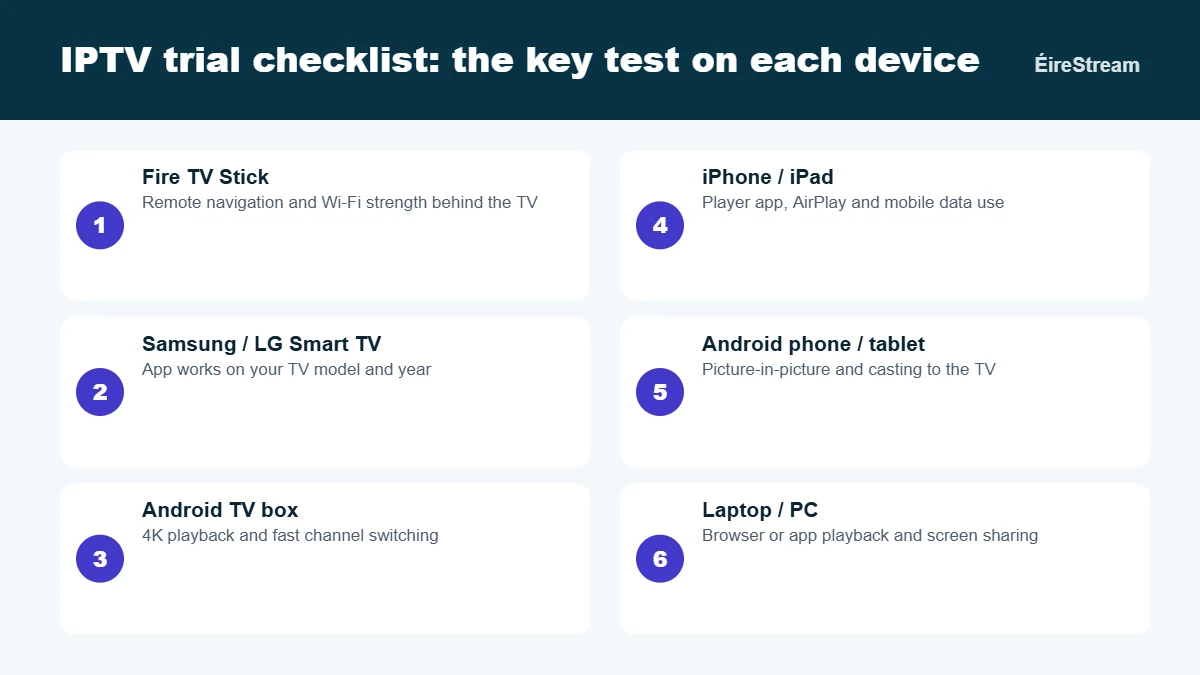
| Device | What a pass looks like | Setup help |
|---|---|---|
| Fire TV Stick | Navigation with the remote feels quick; the stream holds on Wi-Fi from behind the TV. | Install IPTV on a Fire TV Stick |
| Samsung or LG Smart TV | The player app is available and stable on your TV model and year. | Set up IPTV on a Smart TV |
| Android TV box | 4K channels play smoothly and channel switching is fast. | Install a player from the Play Store before the trial |
| iPhone or iPad | The app plays smoothly; screen mirroring works if you plan to use it. | IPTV on iPhone and Android |
| Android phone or tablet | Playback on mobile data is acceptable; casting to the TV works if you need it. | IPTV on iPhone and Android |
| Laptop or PC | The app or browser player works and the picture scales to full screen. | Check with support which player to use |
Fire TV Stick: check the Wi-Fi
Fire Sticks sit behind the TV, often far from the router, and that is where most buffering comes from. During the trial, play a live match for several minutes. If it stutters, try moving the router, using the HDMI extender that came with the stick, or a mesh Wi-Fi point.
Smart TV: check app support for your model
Samsung and LG TVs differ by year and model. Make sure the player app installs and runs smoothly on yours. If the TV is older and struggles, a Fire TV Stick or Android box is a cheap fix.
Android TV box: check 4K and switching speed
Boxes are usually the most capable option. Use the trial to check that 4K channels play cleanly and that changing channel is quick.
iPhone, iPad and Android: check playback and mobile data
Phones and tablets are great for watching in another room or on the move. Check playback on Wi-Fi and, if you plan to use it, on mobile data, keeping an eye on your data allowance.
A 30-minute plan that works on any device
| Minutes | What to do |
|---|---|
| 0 to 3 | Enter your trial details and let the channel list load. |
| 3 to 8 | Open RTÉ One, RTÉ2, TG4 and Virgin Media One. |
| 8 to 18 | Watch a live match full screen and look for freezing. |
| 18 to 22 | Check the guide and switch between five channels. |
| 22 to 26 | Start a film from the on-demand library. |
| 26 to 30 | Send support a question and note the reply time. |
Want to see everything that is included? Browse our channel list.
If something goes wrong during the trial
- Login not accepted: check for extra spaces when typing the details, or ask support to resend them.
- Buffering: test your speed. About 15 Mbps is needed for HD and 25 Mbps for 4K. Try a wired connection if possible.
- App will not install: your device may need an update, or a different player app. Support can suggest one.
- No picture on some channels: let us know which ones during the trial so we can check.
The quickest route to help is our support page or WhatsApp.
After the IPTV trial
When the 30 minutes are up, the trial simply ends. Nothing is charged. If it passed on your device, the usual next step is one month, then a longer plan to cut the monthly cost:
| Plan | Price | Per month |
|---|---|---|
| 1 month | €14.99 | €14.99 |
| 3 months | €29.99 | €10.00 |
| 6 months | €39.99 | €6.67 |
| 12 months | €49.99 | €4.17 |
Full details are on our pricing page, and our terms and refund policy explain how plans work.
Safe and legal viewing
Install apps from official stores, keep your login to yourself and pay with a method that leaves a record. Make sure the way you watch complies with the rules that apply in Ireland.
IPTV trial: frequently asked questions
How long is the ÉireStream IPTV trial?
Our IPTV trial lasts 30 minutes and is free. Ask on WhatsApp, tell us your device, and your trial details usually arrive within about five minutes.
Which device should I use for an IPTV trial?
Use the device you will watch on most, usually the main TV with a Fire TV Stick, Smart TV app or Android box. A phone is fine for a quick look, but it will not show you how the service performs on the big screen.
Can I test two devices in one IPTV trial?
You can switch device during the trial, but with only 30 minutes it is better to focus on your main TV. Test a second device during your first paid month.
What if the app does not work on my Smart TV during the trial?
Some older Smart TVs have limited app support. If that happens, tell support during the trial: a Fire TV Stick or Android box is an inexpensive way to get every feature.
Do I need to give card details for the IPTV trial?
No. The trial is free and needs no card. When it ends nothing is charged, and you choose a plan only if you want one.
The bottom line
An IPTV trial is only as good as the test you run. Use the device you will really watch on, run its key test, follow the 30-minute plan and you will know whether ÉireStream suits your home.